Publishing changes
When you make a change in happyDomain, it is not sent to your hosting provider straight away. Your edits accumulate in a working copy, and nothing reaches your provider until you decide to publish. Before that happens, happyDomain lets you review the exact list of changes that your edits produce, fine-tune what will be applied, and record a message for your history.
Opening the diff
In the zone editor, the Publish my changes button shows a small counter with the number of pending changes detected for your zone. Click it to open the review window.
happyDomain computes the difference between the zone as it currently lives at your provider and the working copy you have been editing. If everything is already in sync, you will simply see a message telling you there is nothing to apply.
Understanding the diff
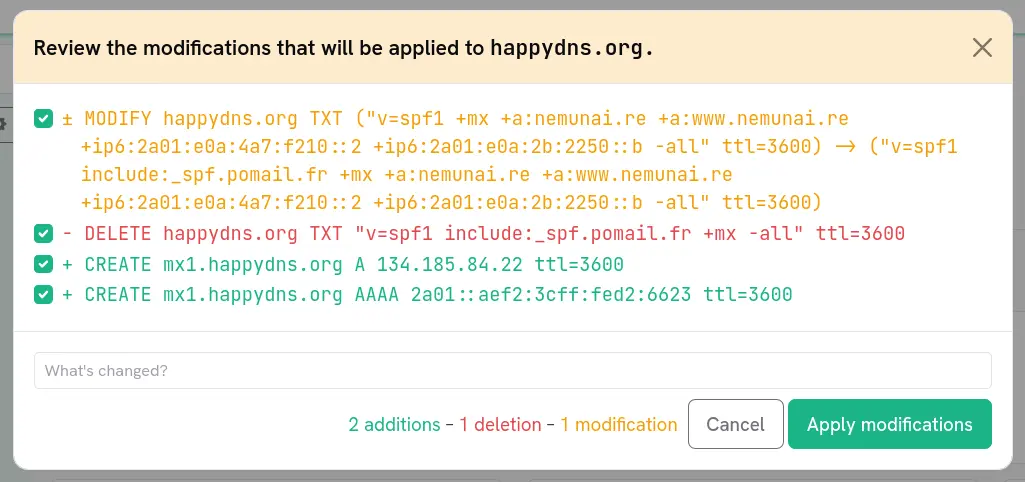
Each line of the diff describes one concrete correction, written in a human-readable form and colour-coded by its nature:
| Colour | Meaning |
|---|---|
| Green | An addition (a record being created) |
| Red | A deletion (a record being removed) |
| Yellow | A modification (an existing record being changed) |
| Blue | Another kind of change (for example a reordering or provider-specific operation) |
At the bottom of the window, a summary recaps how many additions, deletions and modifications are currently selected.
Selecting which changes to apply
Every line in the diff has a checkbox. By default the changes are listed for your review, and you decide which ones to keep:
- Uncheck any change you do not want to apply right now. It stays in your working copy and will reappear next time.
- Keep checked only the changes you are confident about.
This is useful when you have made several unrelated edits but only want to publish some of them, or when you want to roll out a sensitive change separately.
The summary and the apply button update live to reflect your current selection. If nothing is selected, the apply button stays disabled.
Writing a commit message
Before applying, enter a message in the What’s changed? field. This message is recorded in your history alongside the changes.
The diff describes the technical operations, but your message is what makes your history readable later on. When you need to look back at what you did, “Move mail to a new provider” is far easier to understand than re-deriving meaning from a list of IP changes.
A confirmation step for safety
Depending on your account preferences, happyDomain may show an extra confirmation screen after you choose to apply:
- It asks your provider to prepare the corrections, then shows you exactly how many operations the provider will actually run for your selection.
- If that number differs from what you selected (for instance because a change was already applied, or the provider expands one change into several), a warning is displayed so you can double-check before confirming.
You can configure whether this confirmation appears always, never, or only when the prepared corrections do not match your selection.
After publishing
Once you confirm, happyDomain sends the selected changes to your provider and records the operation, with your message, in the domain’s log. From there you can review past deployments at any time, and roll back to an earlier state if needed; see /en/pages/domain-history/.
To inspect the resulting zone itself rather than the diff, or to keep a copy as a standard zone file, see /en/pages/import-export/.